blog article
From EWDK Build to Bidirectional Ping: Debugging Windows' New WiFiCx Sample Driver
In 2024 I filed a GitHub issue asking Microsoft for a WiFiCx reference driver. It closed this year, pointing at a brand-new sample that didn't actually pass traffic. Here's the pktmon trace that found the missing access point, and the PR that fixed it.
Background
Back in mid-2024 I was scoping a proposal for a client who needed a
Windows 11 Wi-Fi driver for real hardware. Windows moved the Wi-Fi
driver model to WiFiCx starting with Windows 11 — the older WDI miniport
model is deprecated — but when I went looking at
microsoft/Windows-driver-samples for a reference to build from, the
network/wlan folder only had the old WDI sample. No WiFiCx equivalent.
So on July 15, 2024 I filed issue #1197
asking Microsoft to add one. It sat quietly for over a year, got swept up in
a stale-issue cleanup and closed, and I reopened it. On June 22, 2026 —
almost two years later — it was finally closed for real: a Microsoft
engineer pointed at
PR #1394,
which had just landed a WiFiCx sample: wificx, netvadapter, and the
Ethernet-flavored netvmini, wired together with demo videos to prove it
worked.
Good news for future clients — a real WiFiCx reference finally exists. So I did what anyone evaluating a new sample driver should do before recommending it: I checked it out, built it, and tried to make two instances of it talk to each other. That’s when the fun started.
This post is the field report — the architecture, the simulation model, the
debugging path (DbgPrintEx → pktmon), and the one conceptual gap that took
the longest to see: nobody was playing the access point. The result is
PR #1399,
open against the sample as of this writing.
WiFiCx, briefly
WiFiCx is Microsoft’s WDF-based class extension for Wi-Fi drivers. Like other Cx frameworks, it exists to take a large, hard-to-get-right slice of driver logic out of every IHV’s hands and put it in one framework Microsoft owns and tests. Concretely, it splits a Wi-Fi driver into two lanes:
- WiFiCx owns the control path — scan, connect, disconnect, radio state, authentication — expressed to the IHV driver as WDI (Wireless Driver Interface) task and property messages.
- NetAdapterCx owns the data path — tx/rx packet queues and rings — the same class extension used by ordinary Ethernet NetAdapterCx drivers.
The IHV driver’s job shrinks to implementing a set of callbacks
(WifiIhv* for control, EVT_NET* for data) and talking to the actual radio.
Everything above that — NDIS, the Native WiFi filter (nwifi.sys), the WLAN
service — is unmodified OS code.
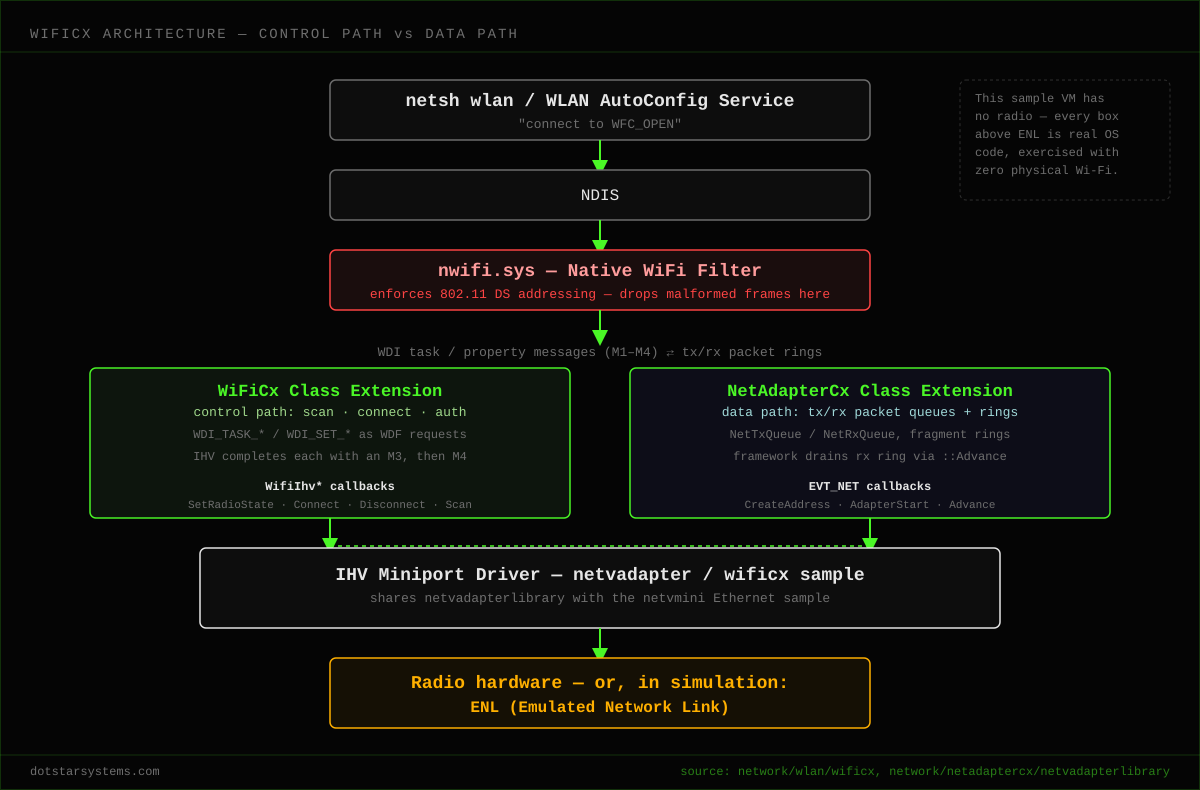
One detail from that diagram matters for everything that follows: WDI task
commands need two completions. Where a WDI property request completes
with a single M3 indication, a WDI task — like WDI_TASK_CONNECT — needs
both an M3 (immediate ack) and an M4 (final completion) before the
framework considers it done. Miss the M4 and the framework just… waits.
How the simulation works — and why it isn’t mac80211_hwsim
There’s no radio hardware in this story at all. The Microsoft sample proves
out the whole stack in software using something called the ENL — Emulated
Network Link — a small packet-forwarding engine living in a shared static
library (netvadapterlibrary) that both wificx and its Ethernet sibling
netvmini link against. ENL’s entire job is to take a frame out of one
virtual adapter’s tx ring and drop it into a peer adapter’s rx ring. It’s the
“wire” between two software-only NICs on the same machine.
If you’ve done this on Linux, the reflex comparison is mac80211_hwsim —
but the comparison is worth making precisely, because the two exist to test
different things. mac80211_hwsim fakes exactly one layer: the radio. It’s a
kernel module that presents virtual radios which broadcast to each other like
real RF, and it does no spoofing, no header rewriting, no protocol logic of
its own. Everything above that line — mac80211, cfg80211, hostapd,
wpa_supplicant — is the real, unmodified Linux Wi-Fi stack, run exactly as
it would against real hardware. So when a station sends a frame to the AP
(a “to-DS” frame, addressed to the AP’s BSSID) and the AP relays it onward as
a “from-DS” frame with the receiver address rewritten to the real
destination, that isn’t hwsim doing anything clever — it’s hostapd’s real,
production AP-mode code performing intra-BSS relay exactly as it does on a
physical access point. hwsim’s entire job is to let you validate the actual
software stack — including a real AP — with nothing faked above the
antenna. (If you want to go further and simulate real network conditions —
topology, per-link path loss, mobility — hwsim pairs with wmediumd, a
userspace daemon that controls attenuation between each pair of virtual
radios instead of the default “every radio hears every other radio
perfectly.” Still zero spoofing anywhere in that picture.)
WiFiCx’s sample driver is answering a different question, and doesn’t need any of that. It’s a reference for bringing up a real hardware client driver — there is no sample access point, because on real hardware the AP is a physical device sitting next to you, not something a driver reference is expected to simulate. ENL exists purely to let two instances of that client driver exchange frames locally, so the data path can be exercised with zero hardware. The moment the goal became “make two client instances ping each other with no real AP anywhere,” something had to perform the AP’s one relay hop — and standing up a genuine AP-mode instance of the sample was out of scope, so ENL had to fake that one hop directly.
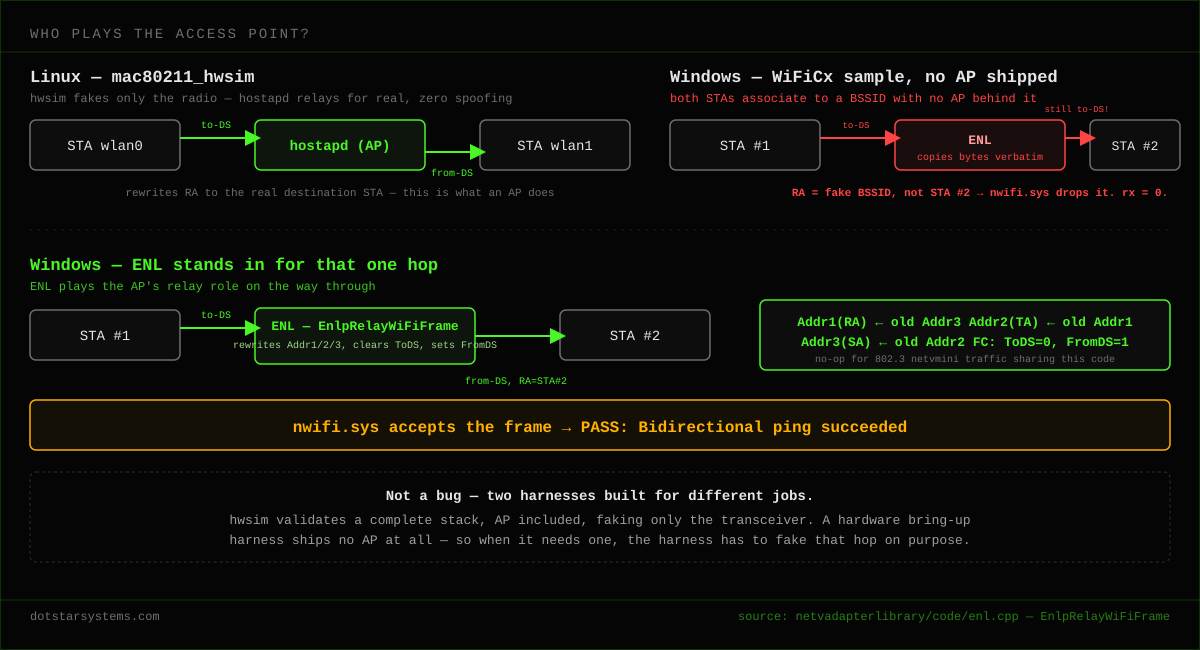
That’s not a shortcoming of WiFiCx relative to hwsim — it’s two harnesses built for different jobs. hwsim exists to validate a complete software stack, AP included, with only the transceiver faked. The WiFiCx sample exists to bring up one hardware client driver, and was never designed to include an AP at all. Reconciling that gap — teaching ENL to stand in for the one piece of infrastructure the sample doesn’t ship — is the thing this whole investigation turned on. Everything below is how it was found.
Test setup
Everything here ran on one Azure VM — no lab, no physical radios:
-
Standard D2s v3 (2 vCPUs, 8 GiB memory)
-
Windows Server 2025 Datacenter, Gen 2 (
2025-datacenter-g2) -
Built and deployed with the EWDK — no Visual Studio install on the box
-
Test signing enabled, since these are locally-signed driver catalogs, not WHQL-signed ones:
bcdedit /set testsigning on
# reboot required
That’s the entire hardware budget for two “Wi-Fi” NICs, a fake access point, and a bidirectional ping between them.
Getting connect to actually connect
Before any data could move, three control-path bugs had to go first (all in one commit, “drive the connect-to-data-path flow on the sample station”):
- The adapter started life already “Connected.”
NetvAdapter::InitializesetMediaConnectStateConnectedup front, so WiFiCx treated everynetsh wlan connectas a roam, not a fresh connect, and quietly skipped the association / data-path activation flow entirely. Fix: reportMediaConnectStateDisconnectedafterAdapterStart, inEvtWifiDeviceCreateAdapter. - The radio defaulted to Software Off, and Windows Server 2025 never
issues
WDI_TASK_CONNECTto a radio that reports itself off. Fix:WifiIhvSetRadioStateunconditionally reportsSoftware=Onfor this radio-less loopback adapter. - Missing M4s. As above — the default handler for unhandled
WDI_TASK_*commands sent only an M3. Task commands need an M4 too, or the request just hangs. Fixed by mapping unhandled tasks to their M4 indication.
With those three in, both adapters connected to a fake open SSID
(WFC_OPEN), got IPs 192.168.100.1 / .2 — and ping was 100% loss.
That’s where the real debugging starts.
The ping mystery, narrowed one layer at a time
The method here was simple and it’s the part worth remembering: at every step, ask “did the frame get copied, or did it get received?” Those are different questions, and conflating them is exactly how this bug hides.
Step 1 — ENL forwards fine, in both directions. I instrumented
EnlpIterationRoutine with DbgPrintEx and watched it in DebugView
during a forced-unicast ping (ping 192.168.100.99 -S 192.168.100.1, with a
static ARP entry pointing .99 at the peer’s MAC, so the frame is
unambiguously unicast on the wire):
ENL fwd tx-port=0 rx-port=1 rxQCount=1 rxState=1 hasFrag=1 hasPkt=1 drop=0drop=0, four times, one per ping. The frame is being copied into the
peer’s rx ring. But Get-NetAdapterStatistics on the peer showed
ReceivedUnicastPackets = 0. Contradiction — so the bug isn’t in ENL.
Step 2 — the rx ring drains too. Instrumenting NetvRxQueue::Advance
showed the same story from the other side:
RX adv port=1 fBegin=82 fEnd=81 haveFrag=1 havePkt=1 firstScr=1 drained=1drained=1, and the ring’s begin pointer advances every time. The
NetAdapterCx data path is handing the filled fragment up and out of the
ring correctly. So ENL is right, and the ring is right — and the NIC’s own
receive counter still reads zero. At this point Get-NetAdapterStatistics
had already burned two rounds of instrumentation on a wild goose chase, which
is exactly why the next tool switch mattered.
Step 3 — pktmon finds it. ReceivedUnicastPackets turned out to be an
unreliable signal for this path. Switching to pktmon — which traces
packets at the boundary of every network component, with no rebuild required
— was the turning point:
pktmon filter add ping99 -i 192.168.100.99
pktmon start --capture --comp all --pkt-size 128 -f C:\pktmon.etl
ping 192.168.100.99 -S 192.168.100.1 -n 4
pktmon stop
pktmon format C:\pktmon.etl -o C:\pktmon.txt
The per-component receive-side counters told the whole story in one table:
| Component | Edge | Rx pkts | Meaning |
|---|---|---|---|
netadaptercx.sys miniport | Upper | 4 | WiFiCx indicates all 4 frames up ✓ |
nwifi.sys (Native WiFi filter) | Lower | 4 | nwifi receives all 4 ✓ |
nwifi.sys | Upper | 0 | nwifi drops all 4 ✗ |
nwifi.sys — the OS’s own Native WiFi filter driver — was the one eating the
frames, and the decoded capture showed exactly why:
BSSID:00-20-30-40-50-60 SA:22-22-22-22-00-01 DA:00-20-30-40-50-60 … ICMP echo requestThe forwarded 802.11 frame was to-DS (station-to-AP): Address 1 (the
receiver address) was the fake AP’s BSSID, not the actual destination
station. nwifi.sys correctly refuses a frame that isn’t addressed to it.
That’s the “aha”: both stations associate to the same hard-coded fake BSSID, and ENL is just a medium — but there is no AP. ENL had copied the to-DS frame verbatim, so the receiving station saw a frame addressed to a BSSID it isn’t, going in the wrong DS direction. Nothing in the stack was performing the AP’s relay role, because in the real hwsim world that role is filled by an actual hostapd process, and here it simply wasn’t filled by anything.
The fix: teach ENL to be the AP for one hop
In enl.cpp, EnlpRelayWiFiFrame now rewrites a to-DS 802.11 data frame in
place into the from-DS frame the peer will accept — exactly what an AP does
when it bridges a frame between two associated stations:
Addr1 (RA) <- old Addr3   (final destination = peer MAC)
Addr2 (TA) <- old Addr1   (BSSID)
Addr3 (SA) <- old Addr2   (original sender)
FrameControl: clear ToDS, set FromDS
Address offsets are identical for data and QoS-data frames, and a guard
(type == data && ToDS==1 && FromDS==0) makes the rewrite a no-op for the
802.3 traffic that netvmini pushes through the same shared library.
Ping worked. The lesson generalizes past this one driver, and it isn’t “ENL had a bug” — it’s that a hardware bring-up harness and a full-stack test harness make different trade-offs about which infrastructure they actually include. hwsim can lean on a real hostapd for the AP because full-stack validation is its entire purpose. A driver bring-up harness like this one never shipped an AP in the first place, so the one relay hop it needed had to be built in on purpose, deliberately, as a narrow stand-in — not discovered missing by accident.
Same-host networking gotchas
Two adapters, one subnet, one physical host — that trips a few OS shortcuts that have nothing to do with WiFiCx specifically:
- Duplicate-address ARP suppression. A stack won’t answer an ARP whose
sender IP is one of its own local addresses, which matters when both
“ends” of a link live on the same box. Worked around by seeding static
neighbor entries (
netsh interface ipv4 add neighbors …) inrun.ps1. - Martian-source / loopback shortcuts for same-subnet local IPs are a related risk. The Linux fix for this class of problem is a network namespace; the Windows equivalent is a network compartment. It wasn’t needed once the AP-relay fix landed, but it’s the right tool if a reply path ever gets short-circuited by the loopback path instead of going through the emulated NICs.
The deploy determinism saga: wrong registry key
Getting two instances to reliably come up as …00:01 and …00:02 — no
manual Device Manager clicking, no reboot — turned into its own multi-round
investigation.
Symptoms: the second adapter routinely landed in Error, problem code
10 (CM_PROB_FAILED_START) with no MAC assigned; it “worked” only on a
freshly rebooted machine; and the framework spawns extra WiFiDirect
companion devnodes sharing the same hardware ID and friendly name as the
real adapters, so you can’t tell them apart by either of those.
Root cause: the deploy script wrote the pairing value, MACLastByte, to
the device’s hardware key
(HKLM\SYSTEM\CurrentControlSet\Enum\<id>\Device Parameters\MACLastByte).
But the driver reads configuration via NetDeviceOpenConfiguration →
NetConfigurationQueryUlong, which resolves to the per-adapter software
(Class) key
(…\Control\Class\{4d36e972-…}\<NNNN>\MACLastByte, found via
DEVPKEY_Device_Driver). The hardware-key write was a complete no-op — the
driver never saw it. Every instance kept the INF default of 1, both wanted
address …00:01, collided, and the second one failed to start. Setting the
value by hand in Device Manager’s Advanced tab “worked” purely because that
UI happens to write the software key, not the hardware key.
The diagnostic that nailed it:
$drv   = (Get-PnpDeviceProperty -InstanceId $id -KeyName DEVPKEY_Device_Driver).Data
$swKey = "HKLM:\SYSTEM\CurrentControlSet\Control\Class\$drv"
(Get-ItemProperty $swKey -Name MACLastByte).MACLastByte    # showed 1 on BOTH, always
The fix, in a rewritten deploy.ps1:
- Resolve each devnode’s software key and read/write
MACLastBytethere — not the hardware key. - Clean-slate before install (and on uninstall): remove every
Root\wificxsampleclientkmdevnode — mains, companions, phantoms — so a fresh install can’t collide with a stale node still defaulting to1. - After installing both instances, promote a second main to
MACLastByte=2in its software key and restart it, iterating candidate NICs (any whose software key exposesMACLastByte) and reverting any that turn out to be companions, until…00:02actually shows up. - Verify the real success signal — both
…00:01and…00:02present — rather than assuming success from exit codes.
While in there, a latent driver bug in configuration.cpp also got fixed:
it stored the value it read before validating it, and never wrote the
fallback back on failure, and the MACLastByte table default was 0 — which
AdapterCreateAddress rejects as < 1. Now it validates, then stores once,
with a default/minimum of 1.
Lesson: NetAdapterCx configuration lives in the software/Class key, not the Enum hardware key. It’s an easy, invisible mistake to make, and Device Manager’s UI will paper over it for you right up until you automate it.
Tools that carried the investigation
- DebugView, for kernel
DbgPrintExoutput (DPFLTR_IHVDRIVER_ID/DPFLTR_ERROR_LEVEL) — good for “did my code run, and with what values,” bad for “did the OS actually accept this frame.” - pktmon (
--comp all, thenpktmon formatto decode) — the decisive tool. Per-component flow counters pinpointed exactly which driver in the stack dropped the frame, with zero rebuilds. Get-PnpDevice/Get-PnpDeviceProperty(DEVPKEY_Device_Driver,DEVPKEY_Device_HardwareIds,DEVPKEY_Device_ProblemCode) for the devnode detective work in the deploy saga.Get-NetAdapterStatistics— useful, but not authoritative on this path. Trust pktmon over it.- Claude Code, as a second pair of eyes across the whole investigation —
reading
DbgPrintEx/pktmon output, narrowing down hypotheses, and drafting the PowerShell scripts below. The pktmon trace and the AP-relay insight were the actual find; the tool sped up getting there.
Automating it: deploy.ps1 and run.ps1
None of the above is worth much if it only works once by hand. The two scripts that came out of this are the actual deliverable for anyone trying this sample themselves:
deploy.ps1— builds with the EWDK, signs, installs two instances of the driver, and pairs them deterministically by writingMACLastByteto each adapter’s software key after a clean-slate devnode removal. No manual Device Manager step, no reboot, and it’s idempotent enough to run in a loop while iterating.run.ps1— connects both adapters to the fake SSID, assigns static IPs, seeds the static neighbor entries needed to route around duplicate-address ARP suppression, and pings in both directions, printingPASS: Bidirectional ping succeededon success.
Turning a debugging spike into something reviewable took its own pass, separate from the actual fixes:
- Gated the debug tracing. The ~16
DbgPrintExprobes were essential during the hunt but have no business shipping active. They’re now behind off-by-default macros (NETV_DATAPATH_DEBUGin the shared library, aWFC_TRACEmacro guarded byWIFICX_DATAPATH_DEBUGin the wificx driver), isolated in a single droppable commit. - Rebuilt 33 debugging-session commits into 7 logical ones — build fix,
config fix, control-path fixes, AP-relay rx fix, deploy/test scripts,
README, gated debug — via
git reset --softplus staged file groups, double-checked by diffing the reconstructed tree against the tested tip to confirm they were byte-identical. - A
.gitattributesUTF-16 rabbit hole, purely in local tooling: rebasing kept failing withfailed to encode … from UTF-8 to UTF-16LE-BOM, because the upstreamnetvadapter*.infblobs are stored as UTF-16 while.gitattributesdeclaresworking-tree-encoding=UTF-16LE-BOM— an attribute that requires the blob to be UTF-8 so git can render it as UTF-16 in the working tree. Upstream’s blob violates its own attribute, which mangles the file on every local checkout (though not on GitHub’s server-side merge). Two chained rebases through that broken blob even scrambled the branch once, recovered from a backup tag. Since the PR touches zero.inffiles, the fix was to leave it out of scope entirely and let GitHub’s merge machinery deal with it.
Where it landed
PR #1399 is
open against microsoft/Windows-driver-samples as of this post. On a
Windows Server 2025 VM built with the EWDK — no Visual Studio, no physical
Wi-Fi hardware anywhere — deploy.ps1 followed by run.ps1 now ends in:
PASS: Bidirectional ping succeededTwo virtual stations, one shared fake access point, and one relay hop that nothing was performing until ENL was taught to do it.
Extending this further
Most of the individual issues here are ordinary bugs — a missing M4 completion, a config value read from the wrong registry key. The AP-relay item is different in kind: not a bug, but scope the sample never carried in the first place, made visible only because this PR pushed it into a scenario — two client instances, no real infrastructure — that it was never asked to handle before. What makes WiFiCx worth this level of attention right now is timing: the reference driver is brand new, still rough in exactly the places a real IHV driver has to be solid, and every gap found and fixed against the sample now is a gap a client’s production driver won’t hit later. That’s the actual case for extending Windows’s Wi-Fi driver capabilities — not just filing the one missing sample, but hardening the control-path/data-path split, the test-harness boundaries, and the deploy tooling around it before it’s load-bearing for someone’s hardware.
The bug classes here aren’t Windows-only, either — a missing completion
message, or configuration read before it’s validated and never written back
on fallback, are exactly the kind of thing that recurs in Linux driver
bring-up too (cfg80211/mac80211 command completions, OTP/NVRAM config
ordering). The AP-relay item specifically doesn’t transfer, though, and that
distinction matters: mac80211_hwsim never has this gap, by design, because
it was built to validate a complete stack — real hostapd, zero spoofing —
with only the radio faked. A hardware bring-up harness like WiFiCx’s sample
makes a different, equally valid trade-off: fake nothing but the one hop
you actually need, and ship no infrastructure at all. Neither approach is
wrong; picking the wrong one for your actual goal is where bugs like this one
come from. None of this is IoT-specific, and none of it is even Wi-Fi-specific
— the same discipline applies to any wireless stack (Bluetooth, cellular,
Zigbee/Thread, whatever the radio is), on whichever OS the hardware program
happens to target.
PS: This debugging session leaned on Claude Code throughout, and this post was drafted with it from the raw session notes. The trace, the fix, and the PR are mine; the tool helped get through both faster.
Dotstar Systems builds and debugs wireless drivers and stacks — Windows,
Linux, RTOS, any OS the hardware needs — from a WiFiCx class extension like
this one, to mac80211-based drivers, to firmware for constrained silicon.
This isn’t an IoT-only practice, and it isn’t a Wi-Fi-only one either: if
you’re bringing up a driver for real hardware on any wireless technology and
want someone who has already been through the rough edges,
let’s talk.